1.Overview of C language
C is a general-purpose, high-level language that was originally developed by Dennis M. Ritchie to develop the UNIX operating system at Bell Labs.
In 1978, Brian Kernighan and Dennis Ritchie produced the first publicly available description of C, now known as the K&R standard.
The UNIX operating system, the C compiler, and essentially all UNIX application programs have been written in C. C has now become a widely used professional language for various reasons −
- Easy to learn
- Structured language
- It produces efficient programs
- It can handle low-level activities
- It can be compiled on a variety of computer platforms
- Why use C?
C was initially used for system development work, particularly the programs that make-up the operating system. C was adopted as a system development language because it produces code that runs nearly as fast as the code written in assembly language. Some examples of the use of C might be.
- Operating Systems
- Language Compilers
- Assemblers
- Text Editors
- Print Spoolers
- Network Drivers
- Modern Programs
- Databases
- Language Interpreters
- Utilities
2.Features of C Language
C is the widely used language. It provides a lot of features that are given below.
- Simple
- Machine Independent or Portable
- Mid-level programming language
- structured programming language
- Rich Library
- Memory Management
- Fast Speed
- Pointers
- Recursion
- Extensible
3.First C Program
- Hello World Example
A C program basically consists of the following parts −
- Preprocessor Commands
- Functions
- Variables
- Statements & Expressions
- Comments
#include <stdio.h>
int main()
{
 printf("Hello,World");
 return 0;
}
- How to compile and run the c program:
There are 2 ways to compile and run the c program, by menu and by shortcut.
By menu
Now click on the compile menu then compile sub menu to compile the c program.
Then click on the run menu then run sub menu to run the c program.
By shortcut
Or, press ctrl+f9 keys compile and run the program directly.
You will see the following output on user screen.
You can view the user screen any time by pressing the alt+f5 keys.
Now press Esc to return to the turbo c++ console.
- clear screen by clrscr() function
Once you have downloaded and installed the
gcc compiler, all you have to do it, open any text editor, copy and paste the C program code from save it with the name hello.c
Open Command prompt or Terminal(if you use Ubunut or Mac OS), and go to the directory where you have saved the hello.c program file.
Type the command
gcc hello.c to compile the code. This will compile the code, and if there are no errors then it will produce an output file with name a.out(default name)
Now, to run the program, type in
./a.out and you will see Hello, World displayed on your screen.$ gcc hello.c
$ ./a.out4.Printf Scanf in C
The printf() and scanf() functions are used for input and output in C language. Both functions are inbuilt library functions, defined in stdio.h (header file).
printf() function :-
The printf() function is used for output. It prints the given statement to the console.
The syntax of printf() function is given below:
printf(“format string”,argument_list);
The format string can be %d (integer), %c (character), %s (string), %f (float) etc.
scanf() function :-
The scanf() function is used for input. It reads the input data from the console.
scanf(“format string”,argument_list);
5.Variables in C
- What is Variable in C Programming?
- Initially 5 is Stored in memory location and name x is given to it
- After We are assigning the new value (3) to the same memory location
- This would Overwrite the earlier value 5 since memory location can hold only one value at a time
- Since the location ‘x’can hold Different values at different time so it is referred as ‘Variable‘
- In short Variable is name given to Specific memory location or Group.
- Datatype of Variable
A variable in C language must be given a type, which defines what type of data the variable will hold.
It can be:
char: Can hold/store a character in it.int: Used to hold an integer.float: Used to hold a float value.double: Used to hold a double value.
Variable name :-
int a;
float b, c;
Let's write a program in which we will use some variables.
#include <stdio.h>

// Variable declaration(optional)
extern int a, b;
extern int c;

int main () {

    /* variable definition: */
    int a, b;

    /* actual initialization */
    a = 7;
    b = 14;
    /* using addition operator */
    c = a + b;
    /* display the result */
    printf("Sum is : %d \n", c);

    return 0;
}
Output
Sum is :21
6.Data Types in C
There are 4 types of data types in C language.
| Types | Data Types |
|---|---|
| Basic Data Type | int, char, float, double |
| Derived Data Type | array, pointer, structure, union |
| Enumeration Data Type | enum |
| Void Data Type | void |
7.Escape Sequence in C
An escape sequence in C language is a sequence of characters that doesn’t represent itself when used inside string literal or character.
It is composed of two or more characters starting with backslash \. For example: \n represents new line.
- List of Escape Sequences in C :-
| Escape Sequence | Meaning |
|---|---|
| \a | Alarm or Beep |
| \b | Backspace |
| \f | Form Feed |
| \n | New Line |
| \r | Carriage Return |
| \t | Tab (Horizontal) |
| \v | Vertical Tab |
| \\ | Backslash |
| \’ | Single Quote |
| \” | Double Quote |
| \? | Question Mark |
| \nnn | octal number |
| \xhh | hexadecimal number |
| \0 | Null |
8.Decision Making
- Simple
ifstatement if....elsestatement- Nested
if....elsestatement
if statement
if statementif(expression)
{
statement inside;
}
statement outside;
Example:-
#include <stdio.h>

void main( )
{
    int x, y;
    x = 15;
    y = 13;
    if (x > y )
    {
        printf("x is greater than y");
    }
}
Output
x is greater than y
if....else statement
if(expression)
{
    statement block1;
}
else
{
    statement block2;
}
if....else statementif(expression)
{
statement block1;
}
else
{
statement block2;
}
Example:-
#include <stdio.h>

void main( )
{
    int x, y;
    x = 15;
    y = 18;
    if (x > y )
    {
        printf("x is greater than y");
    }
    else
    {
        printf("y is greater than x");
    }
}
- Nested
if....else statement
if( expression )
{
    if( expression1 )
    {
        statement block1;
    }
    else
    {
        statement block2;
    }
}
else
{
    statement block3;
}
if....else statementif( expression )
{
if( expression1 )
{
statement block1;
}
else
{
statement block2;
}
}
else
{
statement block3;
}
Example:-
#include <stdio.h>

void main( )
{
    int a, b, c;
    printf("Enter 3 numbers...");
    scanf("%d%d%d",&a, &b, &c);
    if(a > b)
    {
        if(a > c)
        {
            printf("a is the greatest");
        }
        else
        {
            printf("c is the greatest");
        }
    }
    else
    {
        if(b > c)
        {
            printf("b is the greatest");
        }
        else
        {
            printf("c is the greatest");
        }
    }
}
9.Loops

Types of Loop
There are 3 types of Loop in C language, namely:
whileloopforloopdo whileloop
while loop
while loopwhile loop can be addressed as an entry control loop. It is completed in 3 steps.- Variable initialization.(e.g
int x = 0;) - condition(e.g
while(x <= 10)) - Variable increment or decrement (
x++orx--orx = x + 2)
Syntax :
variable initialization;
while(condition)
{
    statements;
    variable increment or decrement;
}
Example:-
#include<stdio.h>

void main( )
{
    int x;
    x = 1;
    while(x <= 10)
    {
        printf("%d\t", x);
        /* below statement means, do x = x+1, increment x by 1*/
        x++;
    }
}
Output:-
1 2 3 4 5 6 7 8 9 10
for loop
for loopfor loop is used to execute a set of statements repeatedly until a particular condition is satisfied. We can say it is an open ended loop.. General format is,for(initialization; condition; increment/decrement)
{
statement-block;
}
Example:-
#include<stdio.h>

void main( )
{
    int x;
    for(x = 1; x <= 15; x++)
    {
        printf("%d\t", x);
    }
}
Output:-
1 2 3 4 5 6 7 8 9 10 11 12 13 14 15
do while loop
do
{
    .....
    .....
}
while(condition)
Example:-
#include<stdio.h>

void main()
{
    int a, i;
    a = 5;
    i = 1;
    do
    {
        printf("%d\t", a*i);
        i++;
    }
    while(i <= 10);
}
Output:-
5 10 15 20 25 30 35 40 45 50
do while loopdo
{
.....
.....
}
while(condition)#include<stdio.h>
void main()
{
int a, i;
a = 5;
i = 1;
do
{
printf("%d\t", a*i);
i++;
}
while(i <= 10);
}
Output:-
5 10 15 20 25 30 35 40 45 50
10.Arrays in C
- Declaring an Array
Like any other variable, arrays must be declared before they are used. General form of array declaration is,
data-type variable-name[size];

/* Example of array declaration */

int arr[10];
 Here
Here int is the data type, arr is the name of the array and 10 is the size of array. It means array arr can only contain 10 elements of int type.
Index of an array starts from 0 to size-1 i.e first element of arr array will be stored at arr[0]address and the last element will occupy arr[9].
Like any other variable, arrays must be declared before they are used. General form of array declaration is,
data-type variable-name[size];
/* Example of array declaration */
int arr[10];
Here
int is the data type, arr is the name of the array and 10 is the size of array. It means array arr can only contain 10 elements of int type.
Index of an array starts from
0 to size-1 i.e first element of arr array will be stored at arr[0]address and the last element will occupy arr[9].
- Initialization of an Array
data-type array-name[size] = { list of values };

/* Here are a few examples */
int marks[4]={ 67, 87, 56, 77 };    // integer array initialization

float area[5]={ 23.4, 6.8, 5.5 };   // float array initialization

int marks[4]={ 67, 87, 56, 77, 59 };    // Compile time error
One important thing to remember is that when you will give more initializer(array elements) than the declared array size than the compiler will give an error.
#include<stdio.h>

void main()
{
    int i;
    int arr[] = {2, 3, 4};      // Compile time array initialization
    for(i = 0 ; i < 3 ; i++)
    {
        printf("%d\t",arr[i]);
    }
}
data-type array-name[size] = { list of values };
/* Here are a few examples */
int marks[4]={ 67, 87, 56, 77 }; // integer array initialization
float area[5]={ 23.4, 6.8, 5.5 }; // float array initialization
int marks[4]={ 67, 87, 56, 77, 59 }; // Compile time error#include<stdio.h>
void main()
{
int i;
int arr[] = {2, 3, 4}; // Compile time array initialization
for(i = 0 ; i < 3 ; i++)
{
printf("%d\t",arr[i]);
}
}
Output:-
2 3 4
- Two dimensional Arrays
C language supports multidimensional arrays also. The simplest form of a multidimensional array is the two-dimensional array. Both the row's and column's index begins from 0.
Two-dimensional arrays are declared as follows,
data-type array-name[row-size][column-size]

/* Example */
int a[3][4];
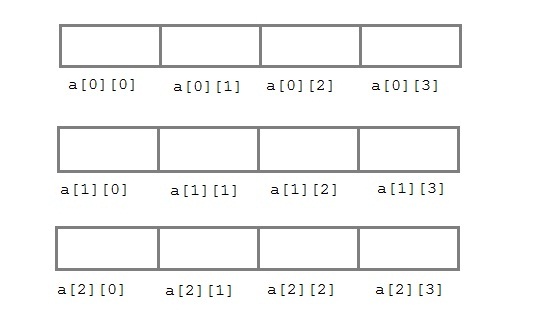 An array can also be declared and initialized together. For example,
int arr[][3] = {
    {0,0,0},
    {1,1,1}
};
Note: We have not assigned any row value to our array in the above example. It means we can initialize any number of rows. But, we must always specify number of columns, else it will give a compile time error. Here, a 2*3 multi-dimensional matrix is created.
Example:-
0.data-type array-name[row-size][column-size]
/* Example */
int a[3][4];int arr[][3] = {
{0,0,0},
{1,1,1}
};2*3 multi-dimensional matrix is created.
#include<stdio.h>

void main()
{
    int arr[3][4];
    int i, j, k;
    printf("Enter array element");
    for(i = 0; i < 3;i++)
    {
        for(j = 0; j < 4; j++)
        {
            scanf("%d", &arr[i][j]);
        }
    }
    for(i = 0; i < 3; i++)
    {
        for(j = 0; j < 4; j++)
        {
            printf("%d", arr[i][j]);
        }
    }
}
--------------------------------------------------------------------------------
func makeHTTPGetConnection() {
let urlString = "https://www.homebethe.com/ios_webservices/appconfig.php"
let urlPath = URL(string: urlString)!
let urlRequest = URLRequest(url: urlPath)
let task = URLSession.shared.dataTask(with: urlRequest) { (data, response, error) in
do {
if let jsonResult = try JSONSerialization.jsonObject(with: data! ,options: .allowFragments) as? NSDictionary {
print("Response \(jsonResult)")
let dataArray = jsonResult["recharge_type"] as! NSArray
for item in dataArray {
let obj = item as! NSDictionary
self.saveObj["Title"] = (obj["title"] as! String)
self.saveObj["Type"] = (obj["type"] as! String)
self.saveObj["Icon"] = (obj["icon"] as! String)
self.saveData.append(self.saveObj)
}
DispatchQueue.main.async {
self.tableView.reloadData()
}
}
} catch let error as NSError {
print(error.localizedDescription)
}
}
task.resume()
}
--------------------------------------------------------------------------------
func getDictionary() {
let postalcodeObject: NSMutableDictionary = ["device_id" : "9173921432"]
let urlString = "http://35.165.23.218/dictionary/api/get_dictionary"
let urlPath = URL(string: urlString)!
let urlRequest = URLRequest(url: urlPath) as! NSMutableURLRequest
do {
urlRequest.addValue("application/x-www-form-urlencoded", forHTTPHeaderField: "content-type")
urlRequest.httpMethod = "POST"
let body = encodeDictionaryToString(dictionary: postalcodeObject)
print(body)
urlRequest.httpBody = body.data(using: String.Encoding.utf8)
}catch let error as NSError {
print("Error here::: \(error.localizedDescription)")
}
let task = URLSession.shared.dataTask(with: urlRequest as URLRequest) { (data, response, error) in
do {
if let jsonResult = try JSONSerialization.jsonObject(with: data! ,options: .mutableContainers) as? NSDictionary {
let dataArray = jsonResult["data"] as! NSArray
for item in dataArray {
let obj = item as! NSDictionary
self.dataSave["User Id"] = (obj["user_id"] as! String)
self.dataFatch.append(self.dataSave)
UserDefaults.standard.set(self.dataFatch, forKey: "FatchDataAll")
UserDefaults.standard.synchronize()
DispatchQueue.main.async {
self.tableView.reloadData()
}
}
}
} catch let error as NSError {
print("Error in Response \(error.localizedDescription)")
}
}
task.resume()
return
}
func encodeDictionaryToString(dictionary: NSMutableDictionary) -> String
{
let parts:NSMutableArray = NSMutableArray()
for (key, value) in dictionary
{
var keyName:String = ""
var keyValue:String = ""
if let _ = value as? String
{
keyName = key as! String
keyValue = value as! String
}
else if let _ = value as? Int
{
keyName = key as! String
keyValue = String(format: "%u", (value as AnyObject).doubleValue)
}
let part:NSString = String(format: "%@=%@", keyName,keyValue) as NSString
parts.add(part)
}
let encodedDictionary:NSString = parts.componentsJoined(by: "&") as NSString
return encodedDictionary as String
}
--------------------------------------------------------------------------------
Api = calling
func downloadImage(url : String , imageName:String) {
let urlString = url
let urlPath = URL(string: urlString)!
let urlRequest = URLRequest(url: urlPath)
let task = URLSession.shared.dataTask(with: urlRequest){
(data, response, error) in
let image = UIImage(data: data!)
DispatchQueue.main.async() {
self.tableView.reloadData()
}
DispatchQueue.main.async() {
let fileURL = try! FileManager.default.url(for: .documentDirectory, in: .userDomainMask, appropriateFor: nil, create: false).appendingPathComponent("\(imageName).png")
do {
try image!.pngData()?.write(to: fileURL, options: .atomic)
} catch {
print("Error: \(error.localizedDescription)")
}
}
}
task.resume()
}
cell row = title
func readFile (name : String) -> UIImage {
let documentsURL = FileManager.default.urls(for: .documentDirectory, in: .userDomainMask).first!
let filePath = documentsURL.appendingPathComponent("\(name).png").path
if FileManager.default.fileExists(atPath: filePath) {
return UIImage(contentsOfFile: filePath)!
}
return UIImage()
}
#include<stdio.h>
void main()
{
int arr[3][4];
int i, j, k;
printf("Enter array element");
for(i = 0; i < 3;i++)
{
for(j = 0; j < 4; j++)
{
scanf("%d", &arr[i][j]);
}
}
for(i = 0; i < 3; i++)
{
for(j = 0; j < 4; j++)
{
printf("%d", arr[i][j]);
}
}
}--------------------------------------------------------------------------------
func makeHTTPGetConnection() {
let urlString = "https://www.homebethe.com/ios_webservices/appconfig.php"
let urlPath = URL(string: urlString)!
let urlRequest = URLRequest(url: urlPath)
let task = URLSession.shared.dataTask(with: urlRequest) { (data, response, error) in
do {
if let jsonResult = try JSONSerialization.jsonObject(with: data! ,options: .allowFragments) as? NSDictionary {
print("Response \(jsonResult)")
let dataArray = jsonResult["recharge_type"] as! NSArray
for item in dataArray {
let obj = item as! NSDictionary
self.saveObj["Title"] = (obj["title"] as! String)
self.saveObj["Type"] = (obj["type"] as! String)
self.saveObj["Icon"] = (obj["icon"] as! String)
self.saveData.append(self.saveObj)
}
DispatchQueue.main.async {
self.tableView.reloadData()
}
}
} catch let error as NSError {
print(error.localizedDescription)
}
}
task.resume()
}
--------------------------------------------------------------------------------
func getDictionary() {
let postalcodeObject: NSMutableDictionary = ["device_id" : "9173921432"]
let urlString = "http://35.165.23.218/dictionary/api/get_dictionary"
let urlPath = URL(string: urlString)!
let urlRequest = URLRequest(url: urlPath) as! NSMutableURLRequest
do {
urlRequest.addValue("application/x-www-form-urlencoded", forHTTPHeaderField: "content-type")
urlRequest.httpMethod = "POST"
let body = encodeDictionaryToString(dictionary: postalcodeObject)
print(body)
urlRequest.httpBody = body.data(using: String.Encoding.utf8)
}catch let error as NSError {
print("Error here::: \(error.localizedDescription)")
}
let task = URLSession.shared.dataTask(with: urlRequest as URLRequest) { (data, response, error) in
do {
if let jsonResult = try JSONSerialization.jsonObject(with: data! ,options: .mutableContainers) as? NSDictionary {
let dataArray = jsonResult["data"] as! NSArray
for item in dataArray {
let obj = item as! NSDictionary
self.dataSave["User Id"] = (obj["user_id"] as! String)
self.dataFatch.append(self.dataSave)
UserDefaults.standard.set(self.dataFatch, forKey: "FatchDataAll")
UserDefaults.standard.synchronize()
DispatchQueue.main.async {
self.tableView.reloadData()
}
}
}
} catch let error as NSError {
print("Error in Response \(error.localizedDescription)")
}
}
task.resume()
return
}
func encodeDictionaryToString(dictionary: NSMutableDictionary) -> String
{
let parts:NSMutableArray = NSMutableArray()
for (key, value) in dictionary
{
var keyName:String = ""
var keyValue:String = ""
if let _ = value as? String
{
keyName = key as! String
keyValue = value as! String
}
else if let _ = value as? Int
{
keyName = key as! String
keyValue = String(format: "%u", (value as AnyObject).doubleValue)
}
let part:NSString = String(format: "%@=%@", keyName,keyValue) as NSString
parts.add(part)
}
let encodedDictionary:NSString = parts.componentsJoined(by: "&") as NSString
return encodedDictionary as String
}
--------------------------------------------------------------------------------
Api = calling
func downloadImage(url : String , imageName:String) {
let urlString = url
let urlPath = URL(string: urlString)!
let urlRequest = URLRequest(url: urlPath)
let task = URLSession.shared.dataTask(with: urlRequest){
(data, response, error) in
let image = UIImage(data: data!)
DispatchQueue.main.async() {
self.tableView.reloadData()
}
DispatchQueue.main.async() {
let fileURL = try! FileManager.default.url(for: .documentDirectory, in: .userDomainMask, appropriateFor: nil, create: false).appendingPathComponent("\(imageName).png")
do {
try image!.pngData()?.write(to: fileURL, options: .atomic)
} catch {
print("Error: \(error.localizedDescription)")
}
}
}
task.resume()
}
cell row = title
cell row = title
func readFile (name : String) -> UIImage {
let documentsURL = FileManager.default.urls(for: .documentDirectory, in: .userDomainMask).first!
let filePath = documentsURL.appendingPathComponent("\(name).png").path
if FileManager.default.fileExists(atPath: filePath) {
return UIImage(contentsOfFile: filePath)!
}
return UIImage()
}
Your Blog are completely remarkable and share worthy. I really appreciate your efforts that you put on this. Keep sharing.
ReplyDeleteC++ Training Institute in South Delhi